How to Remove Background from Images Online Free (E-Commerce & Transparent PNG)
Eliminate cluttered backgrounds and distracting photo scenery in one click. Discover how neural edge detection creates crisp alpha transparencies for e-commerce listings, IDs, and branding.
Technical Document Guide
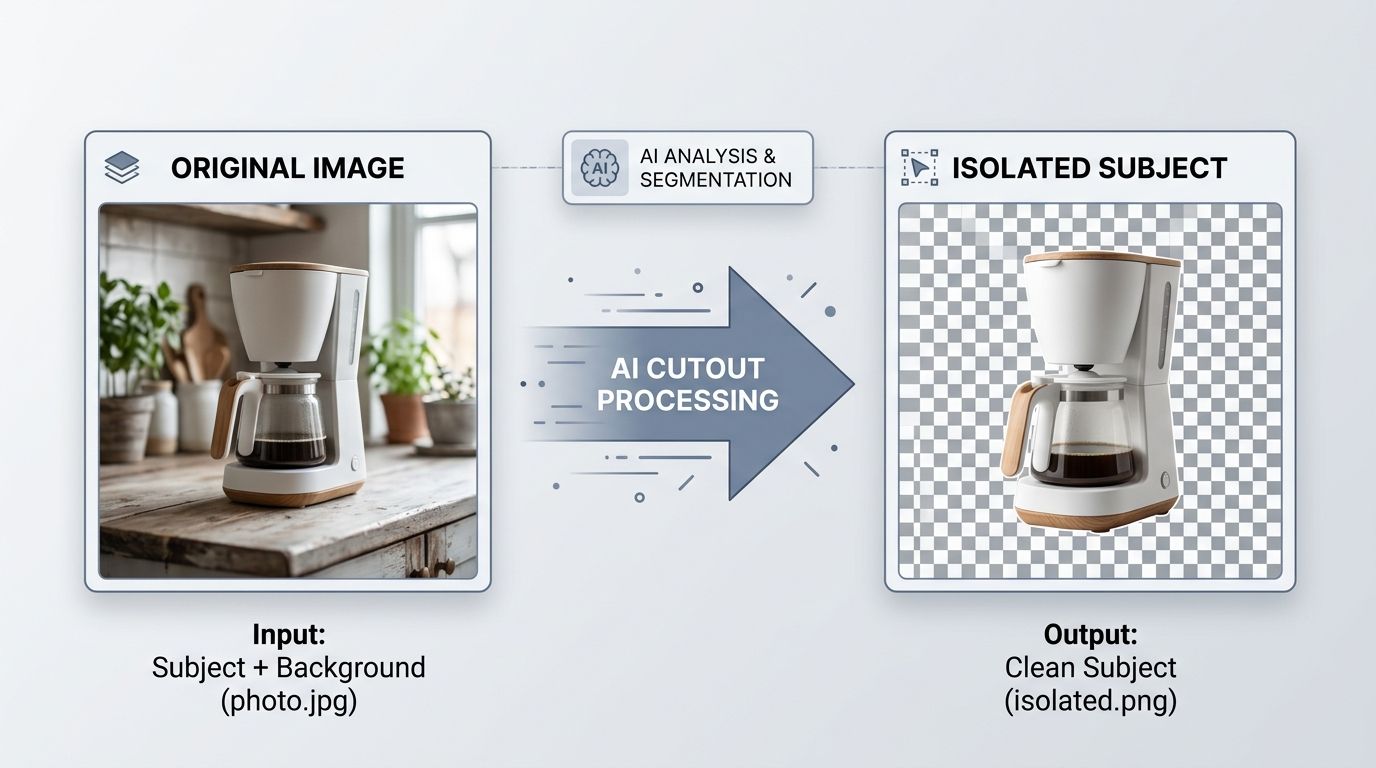 Visual illustration of automated background isolation and high-precision transparent PNG export for e-commerce and graphics.
Key Takeaways & Executive Summary
Automated alpha channel extraction: Modern neural segmentation distinguishes foreground subjects (people, products, animals, signatures) from complex background textures in milliseconds.
Sub-pixel hair and edge refinement: Advanced boundary algorithms eliminate the annoying white halos or jagged edges common with basic color-key thresholding.
Instant e-commerce compliance: Amazon, eBay, and Google Shopping require pure white (RGB 255, 255, 255) or transparent backgrounds for primary product hero images.
High-resolution PNG export: Preserves native 32-bit RGBA color depth without downscaling or blurring the central subject.
No Photoshop needed: Achieve studio-grade cutouts directly in your web browser with zero software licensing fees.
Table of Contents
1. Why Background Removal Is Essential for E-Commerce and Digital Design
2. How Neural Edge Detection and Matting Creates Flawless Transparencies
3. Step-by-Step Guide: How to Remove Background from an Image Free
4. Best Practical Use Cases for Transparent Cutouts
Frequently Asked Questions
1. Why Background Removal Is Essential for E-Commerce and Digital Design
2. How Neural Edge Detection and Matting Creates Flawless Transparencies
3. Step-by-Step Guide: How to Remove Background from an Image Free
4. Best Practical Use Cases for Transparent Cutouts
Frequently Asked Questions
1. Why Background Removal Is Essential for E-Commerce and Digital Design
Whether you are selling physical products on Shopify, building a pitch deck in Figma, or updating your executive LinkedIn headshot, cluttered backgrounds destroy visual professionalism. Product photos captured in home offices or warehouses contain distracting shadows, uneven wall paint, and competing foreground objects.
Major retail marketplaces such as Amazon and Walmart enforce strict merchant guidelines: primary product listings must feature isolated products on pure white or transparent backdrops. Historically, achieving clean cutouts required meticulous manual path tracing with the Photoshop Pen Tool—a tedious process taking 15 to 30 minutes per photo.
Marketplace Conversion Impact
E-commerce studies demonstrate that product photography with clean, isolated backgrounds achieves up to a 28% higher click-through rate compared to busy, natural backgrounds.
2. How Neural Edge Detection and Matting Creates Flawless Transparencies
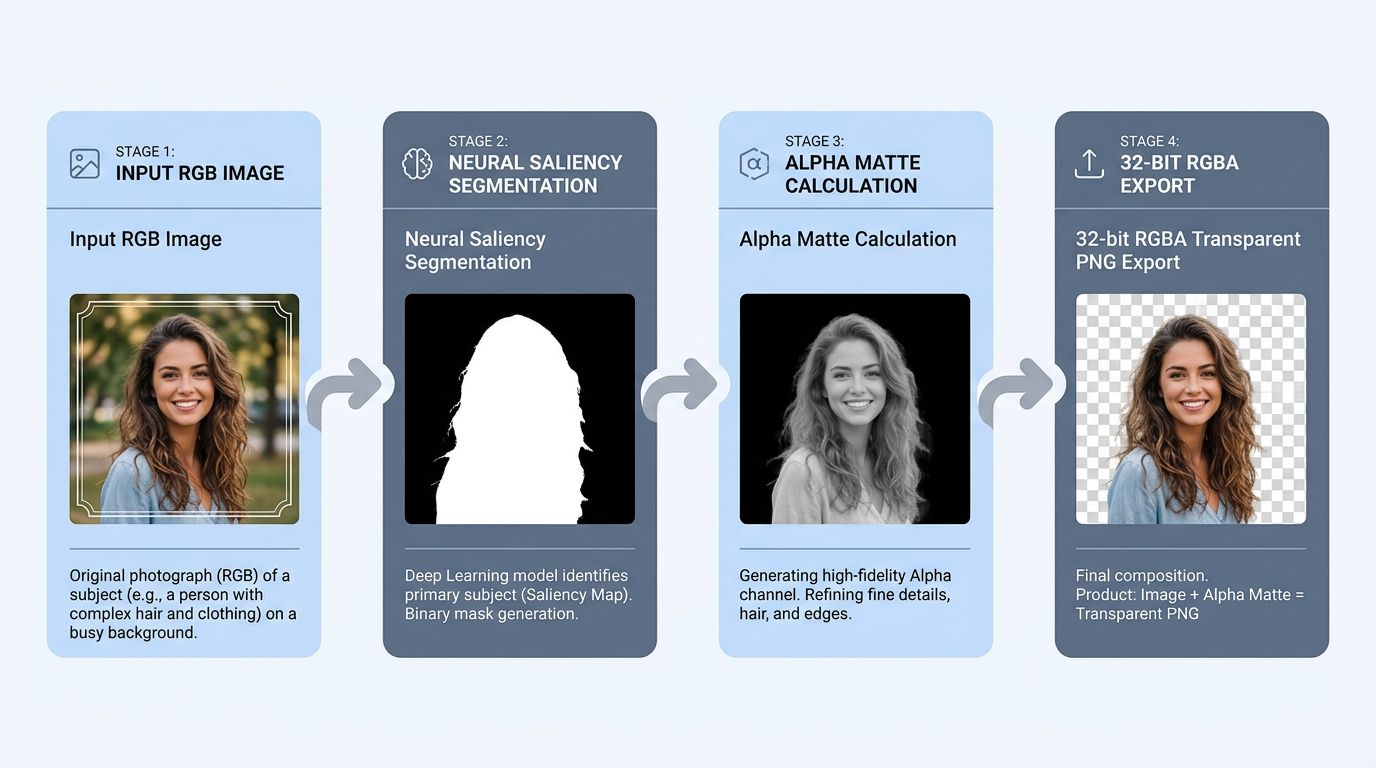
DocsEngine uses modern salient object detection (SOD) and trimap-free image matting algorithms to isolate subjects with millimeter precision:
1. Semantic Segmentation: The model classifies every pixel into foreground, background, or ambiguous transition zones.
2. Alpha Matte Estimation: In transition areas (such as fine hair strands, pet fur, or translucent glassware), the engine computes continuous alpha values from 0 (fully transparent) to 255 (fully opaque).
3. Color Decontamination: Background color spill (such as a green tint reflecting onto skin from foliage) is algorithmically neutralized to prevent discoloration.
| Method | Processing Time | Edge Accuracy on Hair | Transparent PNG Support | Cost |
|---|---|---|---|---|
| Manual Pen Tool (Photoshop) | 15–30 minutes per photo | High (manual labor required) | Yes (manual save) | Paid Adobe subscription |
| Basic Magic Wand / Color Key | 5 seconds | Poor (jagged halo artifacts) | Partial | Free |
| DocsEngine Neural Background Remover | Under 3 seconds | Excellent (sub-pixel matting) | Yes (32-bit RGBA) | 100% Free Online |
3. Step-by-Step Guide: How to Remove Background from an Image Free
Isolating any subject into a transparent PNG takes 3 simple steps:
- Select Your Image: Upload your JPG, PNG, or WebP photo into the DocsEngine Remove Background tool.
- Automated AI Processing: Our engine analyzes the image, detects the foreground object, and strips the backdrop automatically.
- Download Transparent PNG: Click "Download Image" to save your high-resolution cutout with a transparent alpha channel.
4. Best Practical Use Cases for Transparent Cutouts
• E-Commerce Product Listings: Drop product cutouts onto white backgrounds for Amazon, Shopify, eBay, and Etsy.
• Digital Signatures: Remove paper grain and yellowish lighting from photographed signatures to paste cleanly into official PDFs.
• Marketing Collateral: Place team member portraits over branded gradient banners, flyers, and slide decks.
• Custom Merchandise: Create isolated illustrations for print-on-demand t-shirts, mugs, and stickers.
Remove Image Backgrounds Instantly
Create crisp transparent PNG cutouts in one click. Free, fast, and studio quality.
Frequently Asked Questions
No. The subject maintains its original pixel dimensions, color profile, and sharpness without artificial downsampling.
Yes. Our neural network recognizes multiple subjects, pets, apparel, automobiles, and intricate merchandise.
Yes. There are no credit limits, watermarks, or subscription barriers. You can process images free online anytime.
No. Images are processed securely and deleted automatically from temporary buffers every 12 hours at midnight. Your privacy is 100% protected.
Table of Contents
1. Why Background Removal Is Essential for E-Commerce and Digital Design
2. How Neural Edge Detection and Matting Creates Flawless Transparencies
3. Step-by-Step Guide: How to Remove Background from an Image Free
4. Best Practical Use Cases for Transparent Cutouts
Frequently Asked Questions
1. Why Background Removal Is Essential for E-Commerce and Digital Design
2. How Neural Edge Detection and Matting Creates Flawless Transparencies
3. Step-by-Step Guide: How to Remove Background from an Image Free
4. Best Practical Use Cases for Transparent Cutouts
Frequently Asked Questions
Remove Background
Run fast, private document processing in your browser with zero permanent storage.
Share this guide
How to Compress Images to 20KB, 50KB, or 100KB for Government Portals & Web
How to Resize Image Dimensions in Pixels, Centimeters & DPI Without Blurring